Technical SEO Audit Checklist | Step-by-Step Guide for 2026
If your website traffic has been stuck, or your rankings suddenly dropped for no clear reason, the issue might not be your content at all. It could be hiding somewhere deeper in the technical structure of your site. That is exactly why every serious site owner needs a technical SEO audit checklist they can run through regularly.
In this guide, I will walk you through the exact steps you should follow to audit your website properly, in plain and simple language. No confusing jargon, just practical steps you can start using today.
Why You Need a Technical SEO Audit Checklist
Before jumping into the steps, let’s quickly understand why this matters so much.
Search engines like Google use bots to crawl your website, understand its structure, and decide whether your pages deserve a spot in search results. If there are technical issues on your site like slow loading pages, broken links, or blocked resources these bots may struggle to crawl and index your content properly. That means even your best-written articles might never show up in search results.
A regular technical audit helps you catch these problems early. Think of it like a health checkup for your website. You do not wait until you are seriously sick to see a doctor; you go for regular checkups to catch small issues before they turn into big problems. The same logic applies here.
Running through a proper checklist regularly also helps you:
- Spot crawl errors before they hurt your rankings
- Improve page speed and user experience
- Fix duplicate content and indexing issues
- Strengthen your site’s overall trust and authority with search engines
- Support the on-page and off-page SEO work you are already doing
If you are new to this topic, it also helps to first understand the basics. You can check our detailed guide on What is Technical SEO to get a solid foundation before running your first audit.
The Complete Technical SEO Audit Checklist
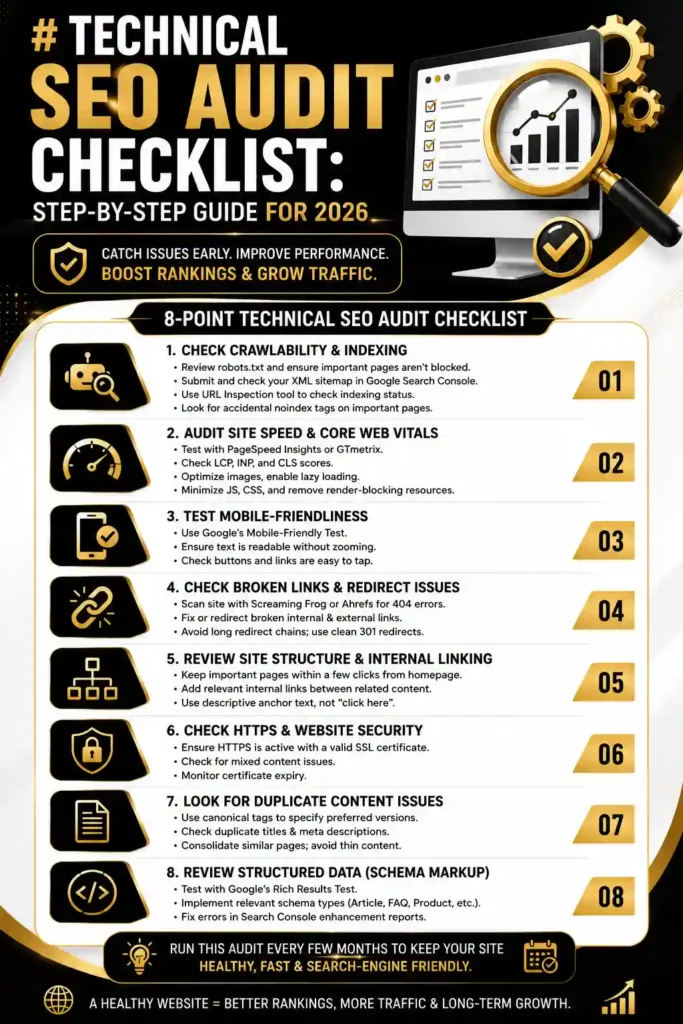
Now, let’s get into the actual checklist. I have broken this down into simple sections so you can go through them one by one.
1. Check Crawlability and Indexing
Start by confirming that Google can actually access and crawl your website properly.
- Check your robots.txt file to make sure you are not accidentally blocking important pages.
- Review your XML sitemap and submit it through Google Search Console.
- Use the “URL Inspection” tool in Search Console to check if key pages are indexed.
- Look for any “noindex” tags that might be mistakenly applied to important pages.
2. Audit Site Speed and Core Web Vitals
Page speed is a major ranking factor, and it also affects how long visitors stay on your site.
- Run your pages through Google PageSpeed Insights or GTmetrix.
- Check your Core Web Vitals scores: Largest Contentful Paint (LCP), Interaction to Next Paint (INP), and Cumulative Layout Shift (CLS).
- Compress large images and enable lazy loading where possible.
- Minimize unnecessary JavaScript and CSS files that slow down loading.
3. Test Mobile-Friendliness
With most traffic now coming from mobile devices, your site absolutely needs to perform well on phones and tablets.
- Use Google’s Mobile-Friendly Test tool.
- Check that text is readable without zooming.
- Make sure buttons and links are easy to tap without overlapping.
4. Check for Broken Links and Redirect Issues
Broken links create dead ends for both users and search engine bots.
- Use a tool like Screaming Frog or Ahrefs to scan for 404 errors.
- Fix or redirect any broken internal and external links.
- Avoid long redirect chains; keep redirects clean and direct (301 redirects to the final destination).
5. Review Site Structure and Internal Linking
A clear site structure helps both users and search engines understand your content better.
- Make sure important pages are not buried too deep in your site’s navigation.
- Add relevant internal links between related articles. For example, connecting this checklist to a guide on Technical SEO Checklist
- helps both readers and search engines see the connection between topics.
- Use descriptive anchor text instead of generic phrases like . the service for small businesss-SEO for Small Business
6. Check HTTPS and Website Security
Security is both a ranking factor and a trust signal for your visitors.
- Confirm your site is using HTTPS with a valid SSL certificate.
- Check for mixed content warnings (pages loading both HTTP and HTTPS resources).
- Make sure your certificate is not close to expiring.
7. Look for Duplicate Content Issues
Duplicate content can confuse search engines about which version of a page to rank.
- Use canonical tags to point search engines to the preferred version of a page.
- Check for duplicate title tags and meta descriptions across your site.
- Consolidate similar pages where it makes sense instead of creating multiple thin versions of the same topic.
8. Review Structured Data (Schema Markup)
Schema markup helps search engines understand your content more accurately, and it can also earn you rich results in search listings.
- Use Google’s Rich Results Test to check your structured data.
- Add relevant schema types like Article, FAQ, Product, or Review where applicable.
- Fix any errors or warnings shown in Google Search Console’s enhancement reports.
Going through this technical SEO audit checklist every few months keeps your website healthy and ensures search engines can crawl, index, and rank your content the way it deserves. Small technical fixes often lead to noticeable improvements in traffic and visibility over time.
If you found this checklist helpful, feel free to follow our page on Facebook where we regularly share practical SEO tips, updates, and audit templates you can use on your own website. and our youtube
Final Thoughts
A technical SEO audit does not need to be overwhelming. Break it down into small, manageable sections like the ones above, and work through them one at a time. Start with crawlability and indexing, then move on to speed, mobile-friendliness, and the rest of the checklist.
Make this a regular habit — ideally every quarter — rather than a one-time task. Search engines, browsers, and best practices keep evolving, and a website that was technically solid last year might already have new issues today. Staying consistent with your audits is one of the simplest ways to protect and grow your organic traffic over the long run.


